Clones count once
APFS clones share blocks until one copy changes. dux reports the private size, so a 4 GB clone that frees 120 MB says 120 MB.
You know du -sh. dux does the next part: it knows which of those gigabytes are caches that rebuild, which are clones, and which you actually need.
~ % du -sh ~/Library/Developer/* | sort -h | tail -3
 14G  CoreSimulator
 22G  Xcode/Archives
 64G  Xcode

# what dux tells you about the same folders
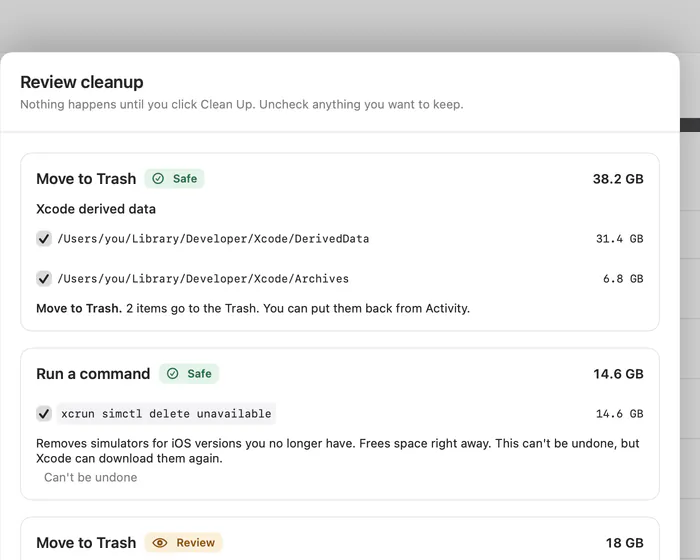
DerivedData    31.4 GB   rebuilds on its own     safe
Old archives    6.8 GB   before Oct 2025         review
Simulators     14.6 GB   all devices, command    review
Clones          1.3 GB   shared, frees nothing   not listed
Each one explained: what it is, whether it rebuilds, and what happens if it goes.
~/Library/Developer/Xcode/DerivedDataBuild products and indexes. Rebuilt on the next build.
~/Library/Developer/Xcode/ArchivesArchives older than 180 days. Keep the ones for versions you released: crash reports need their symbols.
xcrun simctl delete unavailableSimulator devices whose runtime is no longer installed. The command removes only those devices, never a runtime. Direct download only.
~/Library/Developer/Xcode/iOS DeviceSupportSymbols for every OS version of every device you ever connected.
npm, Yarn, pnpm, Bun, CocoaPods, SwiftPM, Cargo, Go, pipDownloaded packages that come back on the next install.
brew cleanup --prune=allInstaller files and old versions of packages that are already installed.
node_modules, target, Pods, .venvFolders of projects you have not touched for 90 days. An install brings them back.
.next, .nuxt, .turbo, .parcel-cacheBuild caches of idle web projects. The next build recreates them.
~/.gradle/caches, ~/.m2/repositoryDownloaded dependencies. They come back, but a slow first build follows.
~/.cache/huggingface, ~/.cache/torchDownloaded models. They download again, which can take a while.
~/Library/Containers/com.docker.dockerOne disk image that grows and rarely shrinks. Shown with its size, never touched by dux. Prune inside Docker.
The rule catalog grows with every release. Build folders of idle projects are suggested for the Trash; Docker is shown with its size and left to you. Tool commands such as simctl and brew run only in the direct download.
APFS clones share blocks until one copy changes. dux reports the private size, so a 4 GB clone that frees 120 MB says 120 MB.
Several names, one copy of the data. Deleting one name frees nothing, and dux says so instead of promising space.
Online only files take no local space. They never inflate the map, and they are never counted as reclaimable.
.app bundles and libraries show as one item, with their contents available when you ask.
The dux command comes with the direct download; install it from Settings in the app. Text output is free; JSON, CSV and cleanup policies are part of Pro, and fleet reporting is part of Business. JSON output carries a schema version.
$ dux suggest ~ --top 25
Ranked cleanups with their safety level and the bytes they free. Changes nothing.
Free$ dux scan ~ --json
Largest folders and totals as JSON. Add --csv for a spreadsheet.
Pro$ dux clean --policy team.json --dry-run
Applies a cleanup policy and shows what it would do, without acting.
Pro$ dux report --json
Volume, free, purgeable, reclaimable by category, largest folders, cloud locations.
Business$ dux report --extension-attribute free-bytes
Prints a Jamf extension attribute; also works as an Intune custom attribute.
Business0success1error2usage3blocked by policy4not in your plan130interruptedFiles go to the Trash or become APFS clones. Without --dry-run dux asks for confirmation on a terminal, and refuses to change anything unattended unless you pass --yes. Every action is logged in Activity, where Undo works while the items are still in the Trash. An administrator profile with ReportOnly makes clean exit with code 3.
maxSafety is safe, review or risky. Rule IDs are in the Rule column of dux suggest.
{
  "schemaVersion": 1,
  "rules": ["xcode.derived-data", "npm.cache"],
  "maxSafety": "safe",
  "roots": ["~"],
  "minimumBytes": 104857600
}
When a system tool cleans up better than moving files, dux shows the exact command, says whether it can be undone, and waits for you. Commands run only in the direct download, never in the sandboxed App Store build.
How review works